> ## Documentation Index
> Fetch the complete documentation index at: https://docs.yiksipay.com/llms.txt
> Use this file to discover all available pages before exploring further.
# Wallets
> Learn how to manage your master wallets
In a nutshell
Master wallets are the backbone of Yiksi Pay's infrastructure. They enable you to manage stablecoin deposits across multiple blockchains, generate dedicated addresses for customers, auto-sweep funds, and initiate withdrawals—all from a single wallet per chain.
 ## Prerequisites
Before creating and managing wallets, ensure you have:
Sign up at [dashboard.yiksipay.com](https://dashboard.yiksipay.com) and complete your account setup.
Generate an API key from **Dashboard → Developers** in the dashboard. You'll need this for all API operations.
Choose between **Testnet** (for development) or **Mainnet** (for production). Wallets are isolated per environment.
Decide which blockchain(s) you need. View [supported blockchains and assets](/en/essentials/integrations) to see available options.
## How It Works
Master wallets let you manage stablecoin deposits across multiple blockchains supported by Yiksi Pay.
When you create a master wallet for a specific blockchain, it allows you to manage everything related to that blockchain with the master wallet:
1. Generating dedicated addresses for your customers to use for depositing stablecoins on multiple blockchains.
2. Whitelisting externally managed addresses for stablecoin deposit monitoring.
3. Auto-sweeping: every stablecoin deposited to any of the dedicated addresses is automatically swept into the master wallet.
4. Withdrawals: you can easily initiate stablecoin withdrawals from the master wallet address to an external address.
### Creating a Wallet
The creation of a master wallet requires four steps:
1. Select the blockchain you want to create the wallet for.
2. Add the stablecoins that you need this master wallet to support.
3. Configure your wallet webhook URL. This will be used for notifications and data synchronization when stablecoins are deposited into any of the dedicated addresses generated through this wallet.
4. Fund the master wallet. To enable auto-sweeping of stablecoins from the dedicated addresses to the master wallet and withdrawal to external address, you need to maintain a balance of the native asset on the blockchain in this master wallet.
One dedicated address generated via any of these master wallets can be used to receive deposits on all other blockchain master wallets, provided the blockchains have `isEvmCompatible: true`.
This means you can issue your customers a single unique address that can be used to deposit stablecoins on multiple blockchains, without worrying about them sending stablecoins to the wrong blockchain.
#### Create a Master Wallet
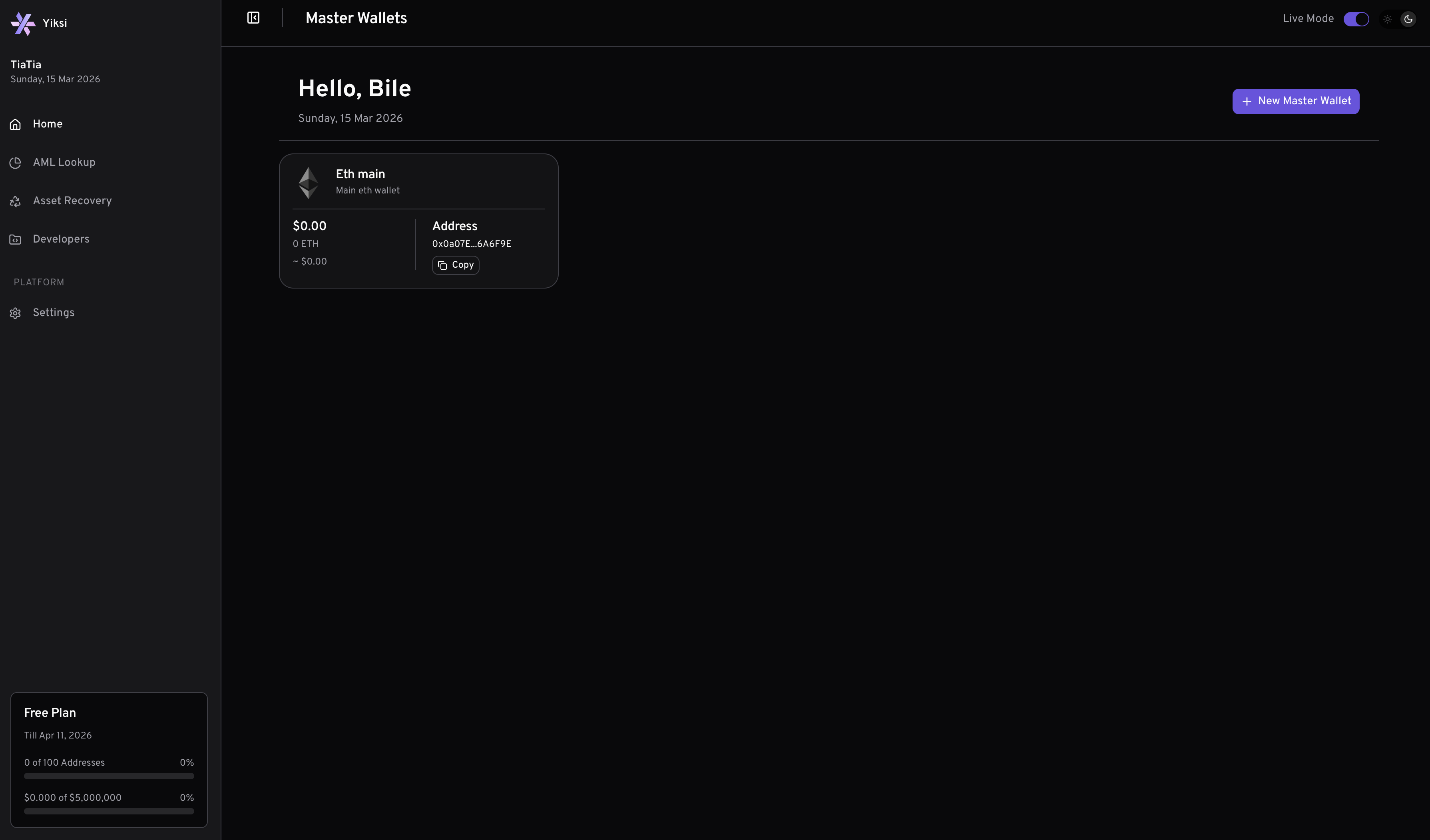
To create a master wallet, go to the dashboard, navigate to the wallets section, and create a wallet to start building a seamless experience for your customers.
The Yiksi Pay dashboard provides a simple, user-friendly interface for generating master wallet.
## Prerequisites
Before creating and managing wallets, ensure you have:
Sign up at [dashboard.yiksipay.com](https://dashboard.yiksipay.com) and complete your account setup.
Generate an API key from **Dashboard → Developers** in the dashboard. You'll need this for all API operations.
Choose between **Testnet** (for development) or **Mainnet** (for production). Wallets are isolated per environment.
Decide which blockchain(s) you need. View [supported blockchains and assets](/en/essentials/integrations) to see available options.
## How It Works
Master wallets let you manage stablecoin deposits across multiple blockchains supported by Yiksi Pay.
When you create a master wallet for a specific blockchain, it allows you to manage everything related to that blockchain with the master wallet:
1. Generating dedicated addresses for your customers to use for depositing stablecoins on multiple blockchains.
2. Whitelisting externally managed addresses for stablecoin deposit monitoring.
3. Auto-sweeping: every stablecoin deposited to any of the dedicated addresses is automatically swept into the master wallet.
4. Withdrawals: you can easily initiate stablecoin withdrawals from the master wallet address to an external address.
### Creating a Wallet
The creation of a master wallet requires four steps:
1. Select the blockchain you want to create the wallet for.
2. Add the stablecoins that you need this master wallet to support.
3. Configure your wallet webhook URL. This will be used for notifications and data synchronization when stablecoins are deposited into any of the dedicated addresses generated through this wallet.
4. Fund the master wallet. To enable auto-sweeping of stablecoins from the dedicated addresses to the master wallet and withdrawal to external address, you need to maintain a balance of the native asset on the blockchain in this master wallet.
One dedicated address generated via any of these master wallets can be used to receive deposits on all other blockchain master wallets, provided the blockchains have `isEvmCompatible: true`.
This means you can issue your customers a single unique address that can be used to deposit stablecoins on multiple blockchains, without worrying about them sending stablecoins to the wrong blockchain.
#### Create a Master Wallet
To create a master wallet, go to the dashboard, navigate to the wallets section, and create a wallet to start building a seamless experience for your customers.
The Yiksi Pay dashboard provides a simple, user-friendly interface for generating master wallet.
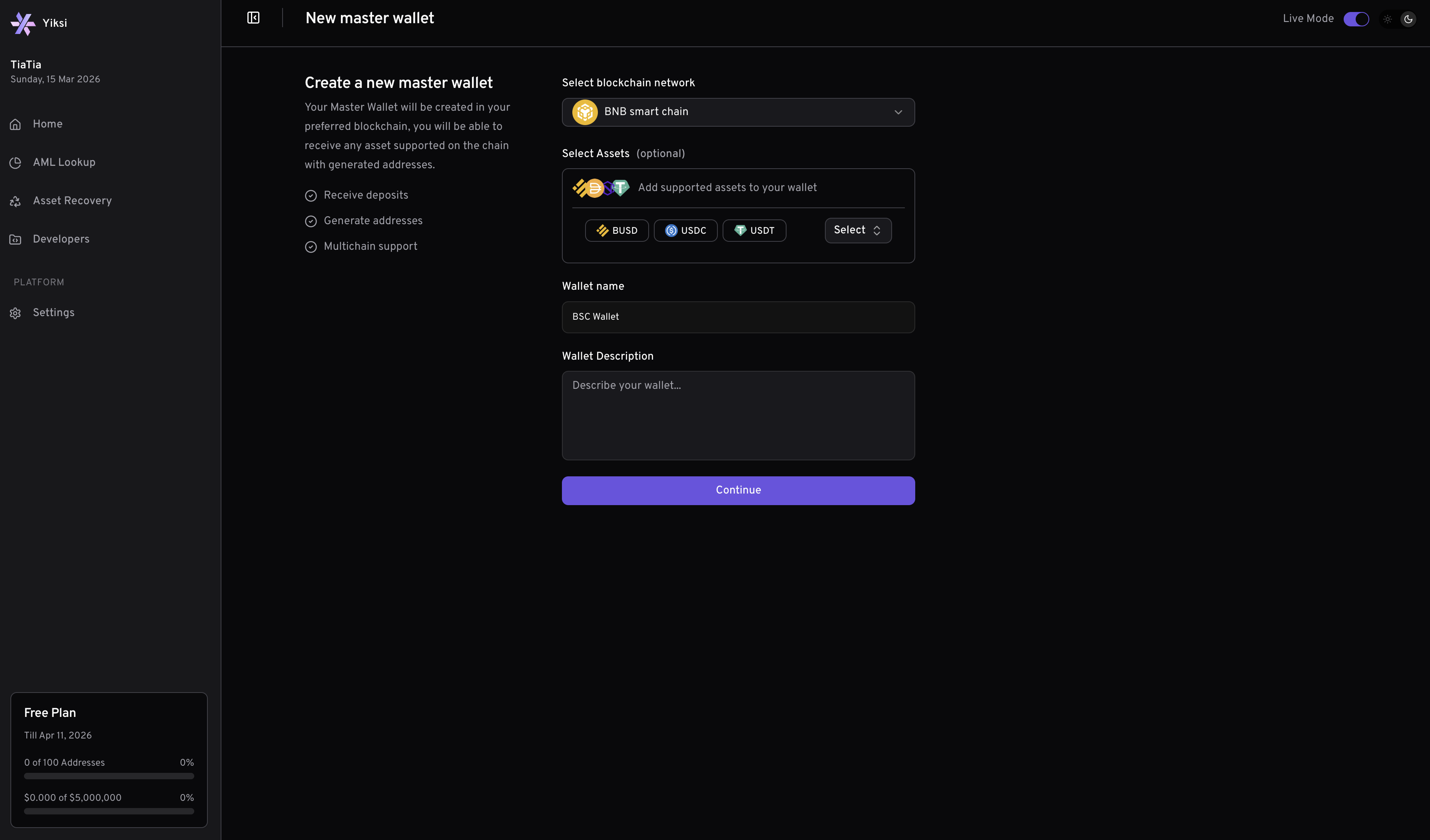 This screenshot demonstrates the process of generating a new master wallet via the Yiksi Pay dashboard. This method is ideal for manual address creation or for teams who prefer a graphical interface.
Environment
This screenshot demonstrates the process of generating a new master wallet via the Yiksi Pay dashboard. This method is ideal for manual address creation or for teams who prefer a graphical interface.
Environment
Wallets created in the live environment are isolated to that environment. The same applies to wallets created in the test environment, including the dedicated addresses created for your customers.
## Wallet Configurations
Yiksi Pay master wallets support two key configuration options to help you manage funds and user experience: **Auto Sweeping** and **Gasless Transactions**.
### Auto Sweeping
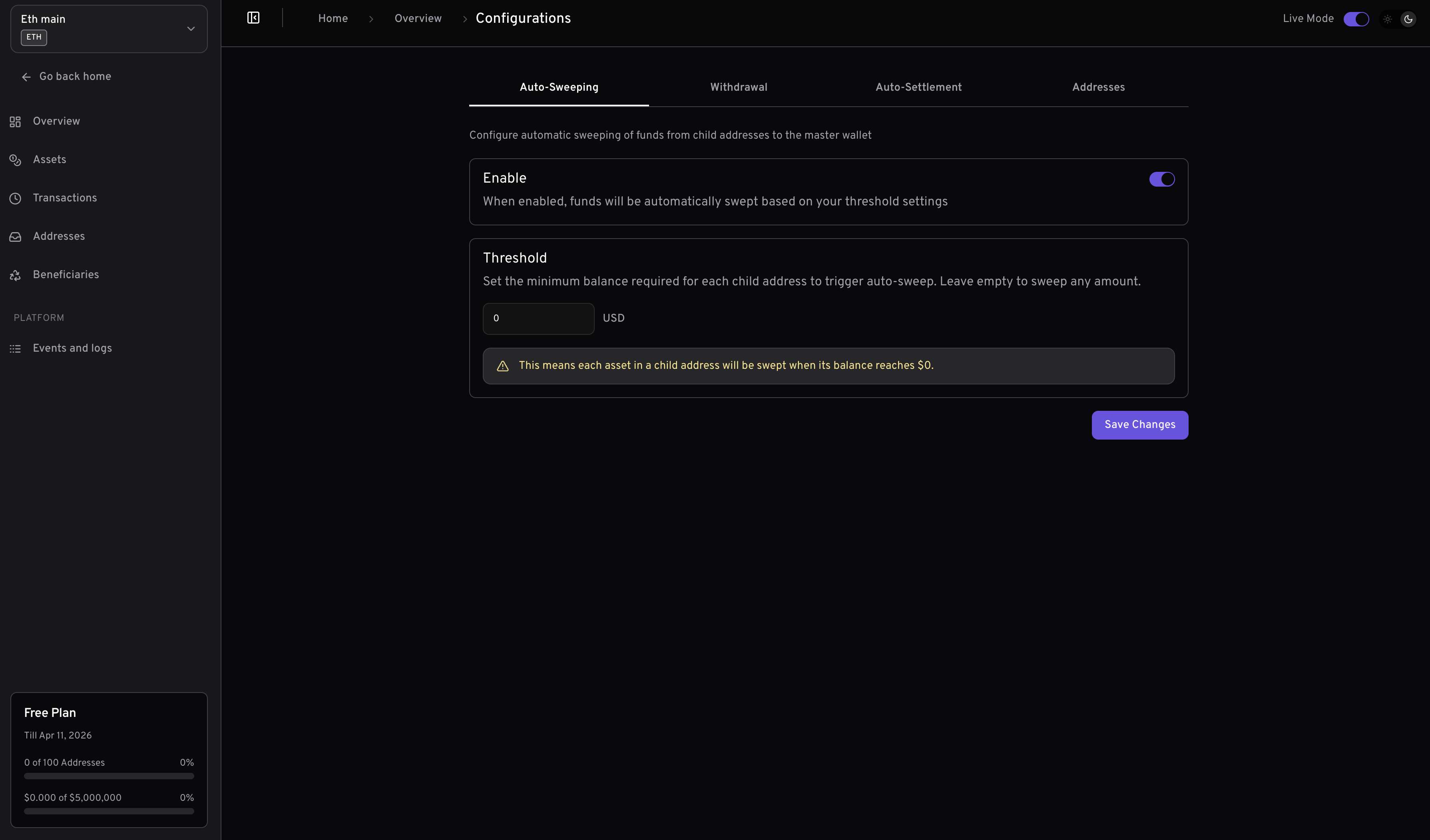
**Enable**\
When enabled, funds deposited to addresses under this wallet will be automatically swept (transferred) to the master wallet. This helps consolidate balances, improves security, and simplifies fund management.
**Threshold**\
Set the minimum balance required for each child address to trigger auto-sweeping. If left empty, any amount received will trigger an auto-sweeping. This allows you to control how frequently sweeping occurs and optimize for gas fees.
* **Default Setting:** By default auto sweeping is set to true and threshold is 0
* **Address Override:** When generating or updating an address, you can override both the auto sweeping enable/disable and threshold settings for that specific address.
The `auto-sweeping` and `threshold` settings on the [addresses](/en/essentials/addresses) level will override the master wallet's configuration for that address. This allows for granular control over auto-sweeping behavior per address.
**Best Practice:**\
Enable auto sweeping and set an appropriate threshold to balance between timely fund consolidation and minimizing transaction fees.
 ### Gasless Transactions
Configure when the master wallet should cover gas fees for withdrawals from child addresses.
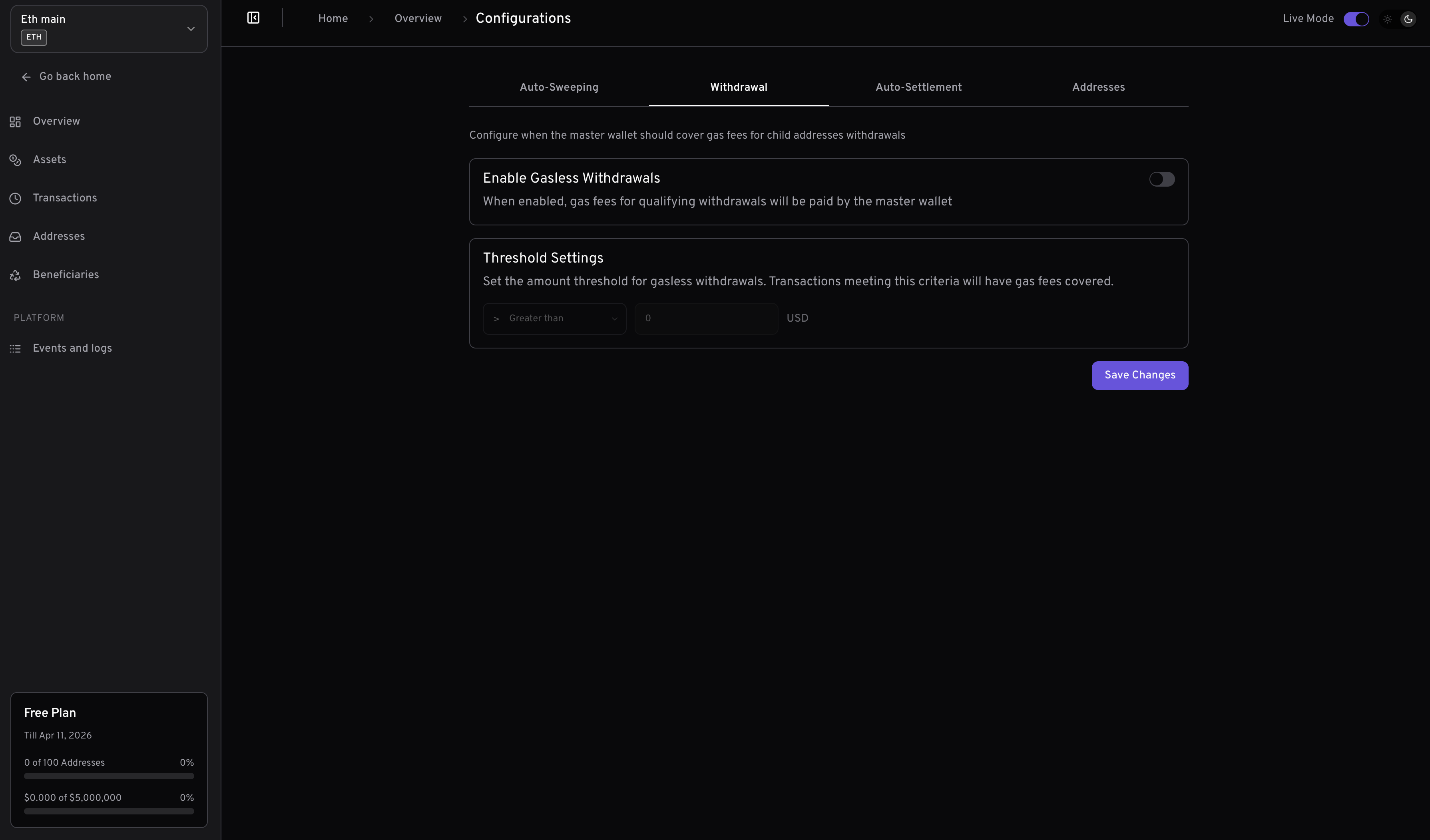
**Enable Gasless Withdrawals**\
When enabled, gas fees for qualifying withdrawals will be paid by the master wallet, providing a seamless experience for your users.
**Threshold Settings**\
Set the amount threshold for gasless withdrawals. Only transactions that meet this threshold will have their gas fees covered by the master wallet.\
You can specify the threshold logic using arithmetic operators:
| Operator | Description | Example (Threshold = 100) |
| -------- | ------------------------ | ------------------------- |
| `gt` | Greater than | Only withdrawals > 100 |
| `gte` | Greater than or equal to | Only withdrawals ≥ 100 |
| `lt` | Less than | Only withdrawals \< 100 |
| `lte` | Less than or equal to | Only withdrawals ≤ 100 |
| `eq` | Equal to | Only withdrawals = 100 |
* **Default Setting:** Gasless Transaction is set to `false` by default and threshold settings are set to 0.
* **Address Override:** When generating or updating an address, you can override both the enable/disable and threshold settings for gasless transactions for that specific address.
The enable `gasless transaction` and `threshold` settings on the [addresses](/en/essentials/addresses) level will override the master wallet's configuration for that address. This allows for granular control over gasless withdrawal behavior per address.
**Best Practice:**\
Enable gasless withdrawals and set appropriate threshold logic to balance user experience and operational costs.
* Set wallet-level configurations according to your business needs and security requirements.
* Use address-level overrides only when you need different behavior for specific addresses.
### Gasless Transactions
Configure when the master wallet should cover gas fees for withdrawals from child addresses.
**Enable Gasless Withdrawals**\
When enabled, gas fees for qualifying withdrawals will be paid by the master wallet, providing a seamless experience for your users.
**Threshold Settings**\
Set the amount threshold for gasless withdrawals. Only transactions that meet this threshold will have their gas fees covered by the master wallet.\
You can specify the threshold logic using arithmetic operators:
| Operator | Description | Example (Threshold = 100) |
| -------- | ------------------------ | ------------------------- |
| `gt` | Greater than | Only withdrawals > 100 |
| `gte` | Greater than or equal to | Only withdrawals ≥ 100 |
| `lt` | Less than | Only withdrawals \< 100 |
| `lte` | Less than or equal to | Only withdrawals ≤ 100 |
| `eq` | Equal to | Only withdrawals = 100 |
* **Default Setting:** Gasless Transaction is set to `false` by default and threshold settings are set to 0.
* **Address Override:** When generating or updating an address, you can override both the enable/disable and threshold settings for gasless transactions for that specific address.
The enable `gasless transaction` and `threshold` settings on the [addresses](/en/essentials/addresses) level will override the master wallet's configuration for that address. This allows for granular control over gasless withdrawal behavior per address.
**Best Practice:**\
Enable gasless withdrawals and set appropriate threshold logic to balance user experience and operational costs.
* Set wallet-level configurations according to your business needs and security requirements.
* Use address-level overrides only when you need different behavior for specific addresses.
 ### Funding
Funding a master wallet is essential for paying the gas fees on the blockchain when `auto-sweeping` stablecoins from the dedicated addresses to the master wallet and for withdrawals to external wallets.
#### Test Environment
* **Ethereum**: Get test ETH here: [Alchemy](https://www.alchemy.com/faucets/ethereum-sepolia) or [Infura](https://www.infura.io/faucet/sepolia)
* **Binance Smart Chain**: Get test BNB here: [Faucet](https://www.bnbchain.org/en/testnet-faucet)
* **Polygon**: Get test MATIC here: [Polygon PoS (Amoy)](https://faucet.polygon.technology/)
* **Base**: Get test ETH here: [Alchemy](https://www.alchemy.com/faucets/base-sepolia)
* **Optimism**: Get test ETH here: [Alchemy](https://www.alchemy.com/faucets/optimism-sepolia)
* **Arbitrum**: Get test ETH here: [Alchemy](https://www.alchemy.com/faucets/arbitrum-sepolia)
* **Tron**: Get test TRX here: [Faucet](https://nileex.io/join/getJoinPage)
* **Solana**: Get test SOL here: [Faucet](https://faucet.solana.com/)
* **Celo**: Get test CELO here: [Faucet](https://faucet.celo.org/alfajores)
#### Live Environment
For the live environment, you can send assets from any wallet or exchange that supports the native assets on each of the blockchains.
Sweeping
### Funding
Funding a master wallet is essential for paying the gas fees on the blockchain when `auto-sweeping` stablecoins from the dedicated addresses to the master wallet and for withdrawals to external wallets.
#### Test Environment
* **Ethereum**: Get test ETH here: [Alchemy](https://www.alchemy.com/faucets/ethereum-sepolia) or [Infura](https://www.infura.io/faucet/sepolia)
* **Binance Smart Chain**: Get test BNB here: [Faucet](https://www.bnbchain.org/en/testnet-faucet)
* **Polygon**: Get test MATIC here: [Polygon PoS (Amoy)](https://faucet.polygon.technology/)
* **Base**: Get test ETH here: [Alchemy](https://www.alchemy.com/faucets/base-sepolia)
* **Optimism**: Get test ETH here: [Alchemy](https://www.alchemy.com/faucets/optimism-sepolia)
* **Arbitrum**: Get test ETH here: [Alchemy](https://www.alchemy.com/faucets/arbitrum-sepolia)
* **Tron**: Get test TRX here: [Faucet](https://nileex.io/join/getJoinPage)
* **Solana**: Get test SOL here: [Faucet](https://faucet.solana.com/)
* **Celo**: Get test CELO here: [Faucet](https://faucet.celo.org/alfajores)
#### Live Environment
For the live environment, you can send assets from any wallet or exchange that supports the native assets on each of the blockchains.
Sweeping
Always ensure you have enough balance in your master wallet to avoid delays in auto-sweeping or withdrawals. We will notify you when your master wallet balance is low.
### Gas Fees: Test vs Live Environment
Understanding the differences in gas fees between test and live environments is crucial for efficient development and deployment.
#### Test Gas Fees
In test environment, gas fees are minimal. Testnets are designed to simulate the mainnet environment without the associated real-world costs. As a result, small amounts of native gas in a testnet can be used for an extended period. This allows developers to test and iterate their integration without incurring significant expenses.
#### Live Gas Fees
In a test environment, gas fees represent real-world expenses. These costs can vary significantly based on the blockchain and network congestion. Properly estimating and managing gas fees is essential to ensure the smooth operation of your applications and to avoid excessive costs.
By leveraging testnets for development and testing, you can minimize expenses and ensure your solutions are robust before deploying to the mainnet.
## Deposit Finder
In rare cases, you might not receive a webhook from our system after a customer sends stablecoins to any of the addresses issued to them. We have an deposit finder mechanism built internally, but you also have the ability to trigger a rescan of the blockchain for a missing transaction using the [Deposit Finder API](/en/api-reference/wallet/deposit-finder) by providing the `transactionHash`
```bash Curl theme={null}
curl --request POST \
--url https://api.yiksipay.com/v1/wallets/{walletId}/rescan/blocks \
--header 'Content-Type: application/json' \
--header 'x-api-key: ' \
--data '{
"transactionHash": "string"
}'
```
```js JavaScript theme={null}
const options = {
method: 'POST',
headers: {'x-api-key': '', 'Content-Type': 'application/json'},
body: '{"blockNumber":"number","transactionHash":"string"}'
};
fetch('https://api.yiksipay.com/v1/wallets/{walletId}/rescan/blocks', options)
.then(response => response.json())
.then(response => console.log(response))
.catch(err => console.error(err));
```
```php PHP theme={null}
"https://api.yiksipay.com/v1/wallets/{walletId}/rescan/blocks",
CURLOPT_RETURNTRANSFER => true,
CURLOPT_ENCODING => "",
CURLOPT_MAXREDIRS => 10,
CURLOPT_TIMEOUT => 30,
CURLOPT_HTTP_VERSION => CURL_HTTP_VERSION_1_1,
CURLOPT_CUSTOMREQUEST => "POST",
CURLOPT_POSTFIELDS => "{\n \"blockNumber\": \"number\",\n \"transactionHash\": \"string\"\n}",
CURLOPT_HTTPHEADER => [
"Content-Type: application/json",
"x-api-key": ''
],
]);
$response = curl_exec($curl);
$err = curl_error($curl);
curl_close($curl);
if ($err) {
echo "cURL Error #:" . $err;
} else {
echo $response;
}
```
*Body parameters*
The required parameter is `transactionHash`, which can be obtained from either the original transaction record or by looking up the transaction on the blockchain explorer.
Happy hacking! ❤️