> ## Documentation Index
> Fetch the complete documentation index at: https://docs.yiksipay.com/llms.txt
> Use this file to discover all available pages before exploring further.
# 提现
> 通过单笔和批量操作将稳定币资产发送到外部地址
简而言之
Yiksi Pay 提现 API 允许您将稳定币资产从钱包发送到外部区块链地址。它支持单笔提现、向多个收款方的批量提现,并在执行前提供手续费估算。
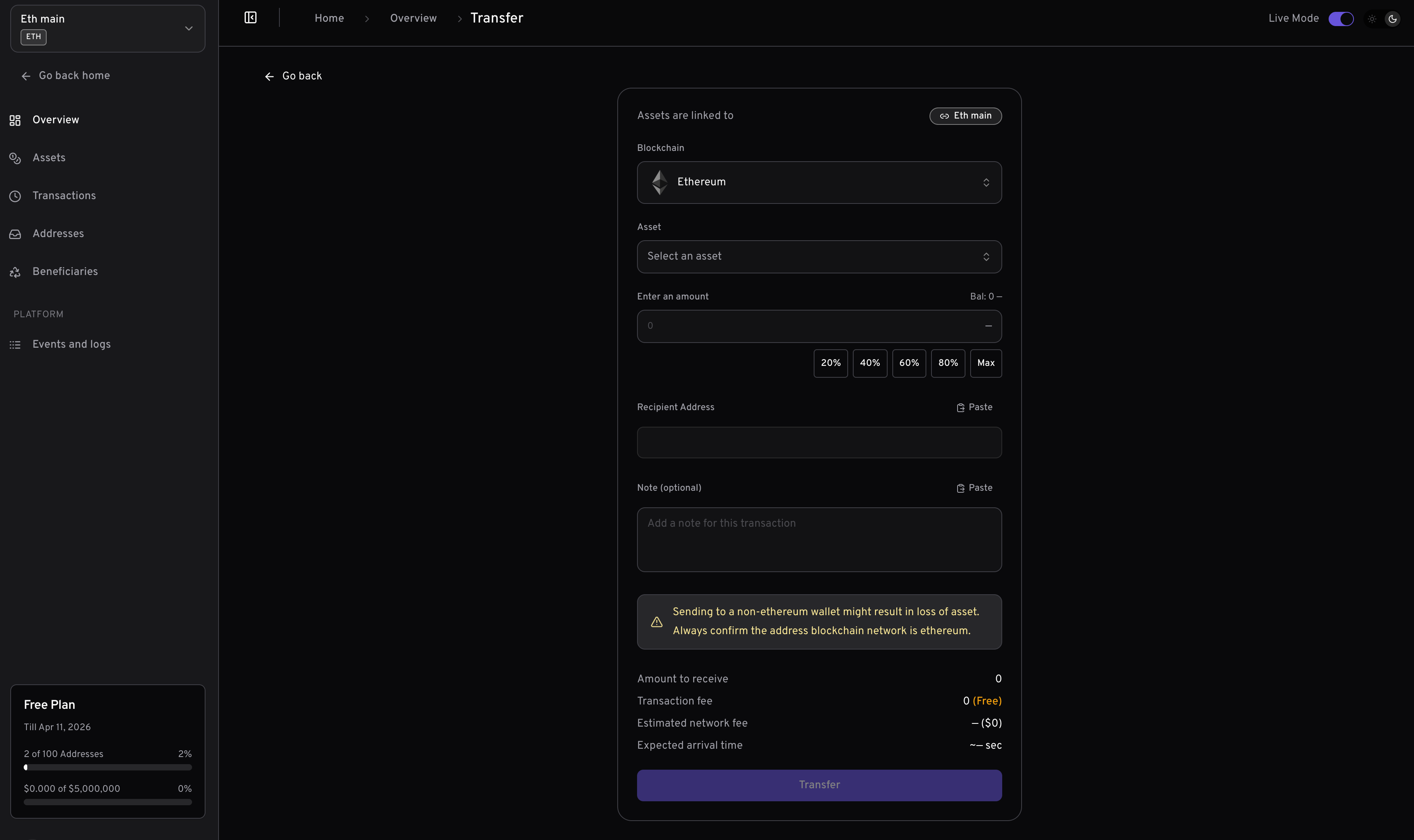 ## 前提条件
在使用提现 API 之前,请确保您已完成以下准备:
从 [Yiksi Pay 控制台](https://dashboard.yiksipay.com) 获取您的 API 密钥。导航到 **设置 → API 密钥** 生成密钥。
通过 [创建钱包 API](/zh/api-reference/wallets/create-wallet) 或控制台创建钱包。您需要 `walletId` 来执行提现操作。
从控制台的 **资产** 或通过 [获取资产 API](/zh/api-reference/miscellaneous/get-assets) 获取要提现资产的 `assetId`。
确保您的钱包有足够的资产余额用于提现,以及足够的原生货币(ETH、BNB、MATIC 等)支付网络手续费。
## 工作原理
提现 API 将稳定币资产从您的 Yiksi Pay 钱包发送到任何外部区块链地址:
通过单次 API 调用向一个收款地址发送资产。
通过单次 API 调用向多个收款方发送资产,减少开销并简化批量支付。
在执行前计算网络手续费,确保余额充足并向用户显示费用。
签名交易但不广播,适用于离线签名或自定义提交等高级用例。
## 主钱包 vs 子地址
提现 API 可在两个级别使用:
直接从主钱包提现。适用于资金库操作和集中式资金管理。
从单个子地址提现。适用于用户特定操作和隔离式资金管理。
### 端点
| 操作 | 主钱包 | 子地址 |
| ----- | -------------------------------------------------- | ------------------------------------------------------------------------ |
| 提现 | `POST /v1/wallets/{walletId}/withdraw` | `POST /v1/wallets/{walletId}/addresses/{addressId}/withdraw` |
| 网络手续费 | `POST /v1/wallets/{walletId}/withdraw/network-fee` | `POST /v1/wallets/{walletId}/addresses/{addressId}/withdraw/network-fee` |
| 仅签名 | `POST /v1/wallets/{walletId}/withdraw/sign` | `POST /v1/wallets/{walletId}/addresses/{addressId}/withdraw/sign` |
***
## 单笔提现
向单个收款地址发送资产。
### 请求参数
| 参数 | 类型 | 必需 | 描述 |
| ----------- | ------ | --- | --------------------------------- |
| `assetId` | string | 是\* | 要提现的资产 UUID。如果未提供 `assets` 数组则必需。 |
| `address` | string | 是\* | 目标钱包地址。如果未提供 `assets` 数组则必需。 |
| `amount` | string | 是\* | 提现金额。必须大于 0。如果未提供 `assets` 数组则必需。 |
| `reference` | string | 否 | 您的内部提现跟踪 ID。 |
| `note` | string | 否 | 简短消息或内部备注。不会显示在链上。 |
| `metadata` | object | 否 | 用于附加交易详情的自定义键值对。 |
标有 `*` 的参数对于单笔提现是必需的,但如果您使用 `assets` 数组进行批量提现则不需要。
### 单笔提现示例
```bash Curl theme={null}
curl --request POST \
--url https://api.yiksipay.com/v1/wallets/{walletId}/withdraw \
--header 'Content-Type: application/json' \
--header 'x-api-key: ' \
--data '{
"assetId": "asset-uuid-here",
"address": "0xRecipientAddress...",
"amount": "100",
"reference": "payout-12345",
"note": "月度支付",
"metadata": {
"userId": "user_abc123",
"payoutType": "salary"
}
}'
```
```javascript JavaScript theme={null}
const withdrawal = await fetch(
`https://api.yiksipay.com/v1/wallets/${walletId}/withdraw`,
{
method: 'POST',
headers: {
'Content-Type': 'application/json',
'x-api-key': apiKey
},
body: JSON.stringify({
assetId: 'asset-uuid-here',
address: '0xRecipientAddress...',
amount: '100',
reference: 'payout-12345',
note: '月度支付',
metadata: {
userId: 'user_abc123',
payoutType: 'salary'
}
})
}
).then(r => r.json());
console.log('提现已发起:', withdrawal.data);
```
### 单笔提现响应
```json theme={null}
{
"message": "Withdrawal initiated successfully",
"statusCode": 200,
"data": {
"id": "tx-uuid-123",
"hash": "0xabc123...",
"status": "PENDING",
"amount": "100",
"recipientAddress": "0xRecipientAddress...",
"reference": "payout-12345",
"note": "月度支付",
"metadata": {
"userId": "user_abc123",
"payoutType": "salary"
},
"createdAt": "2024-01-15T10:30:00Z"
}
}
```
***
## 批量提现
通过单次 API 调用向多个收款方发送资产。批量提现按顺序执行,每笔提现作为单独的区块链交易处理。
### 何时使用批量提现
* **批量支付**:一次性支付多个员工、供应商或合作伙伴
* **批量分发**:向多个地址发送资产
* **多收款方转账**:向不同地址发送不同金额
* **运营效率**:减少 API 调用并简化支付逻辑
### 批量请求参数
对于批量提现,使用 `assets` 数组代替单独的参数:
| 参数 | 类型 | 必需 | 描述 |
| -------- | ----- | -- | ----------------- |
| `assets` | array | 是 | 提现对象数组(每批最多 20 笔) |
**`assets` 数组中的每个项目:**
| 字段 | 类型 | 必需 | 描述 |
| ----------- | ------ | -- | ------------------ |
| `id` | string | 是 | 要提现的资产 UUID |
| `address` | string | 是 | 目标钱包地址 |
| `amount` | string | 是 | 提现金额。必须大于 0。 |
| `reference` | string | 否 | 此笔提现的可选参考备注 |
| `note` | string | 否 | 简短消息或内部备注。不会显示在链上。 |
| `metadata` | object | 否 | 用于附加交易详情的自定义键值对。 |
### 批量提现示例
```bash Curl theme={null}
curl --request POST \
--url https://api.yiksipay.com/v1/wallets/{walletId}/withdraw \
--header 'Content-Type: application/json' \
--header 'x-api-key: ' \
--data '{
"assets": [
{
"id": "asset-uuid-usdc",
"address": "0xRecipient1...",
"amount": "100",
"reference": "payout-001",
"note": "一月工资"
},
{
"id": "asset-uuid-usdc",
"address": "0xRecipient2...",
"amount": "150",
"reference": "payout-002",
"note": "一月工资"
},
{
"id": "asset-uuid-usdt",
"address": "0xRecipient3...",
"amount": "200",
"reference": "payout-003",
"note": "供应商付款"
}
]
}'
```
```javascript JavaScript theme={null}
const batchWithdrawal = await fetch(
`https://api.yiksipay.com/v1/wallets/${walletId}/withdraw`,
{
method: 'POST',
headers: {
'Content-Type': 'application/json',
'x-api-key': apiKey
},
body: JSON.stringify({
assets: [
{
id: 'asset-uuid-usdc',
address: '0xRecipient1...',
amount: '100',
reference: 'payout-001',
note: '一月工资'
},
{
id: 'asset-uuid-usdc',
address: '0xRecipient2...',
amount: '150',
reference: 'payout-002',
note: '一月工资'
},
{
id: 'asset-uuid-usdt',
address: '0xRecipient3...',
amount: '200',
reference: 'payout-003',
note: '供应商付款'
}
]
})
}
).then(r => r.json());
console.log('批量提现结果:', batchWithdrawal.data);
```
### 批量提现响应
```json theme={null}
{
"message": "Batch withdrawal initiated successfully",
"statusCode": 200,
"data": {
"success": [
{
"index": 0,
"id": "tx-uuid-1",
"hash": "0xabc...",
"status": "PENDING",
"amount": "100",
"recipientAddress": "0xRecipient1...",
"reference": "payout-001"
},
{
"index": 1,
"id": "tx-uuid-2",
"hash": "0xdef...",
"status": "PENDING",
"amount": "150",
"recipientAddress": "0xRecipient2...",
"reference": "payout-002"
},
{
"index": 2,
"id": "tx-uuid-3",
"hash": "0xghi...",
"status": "PENDING",
"amount": "200",
"recipientAddress": "0xRecipient3...",
"reference": "payout-003"
}
],
"errors": []
}
}
```
### 处理部分失败
批量提现支持部分成功。如果某些提现失败,其他提现仍会执行:
```javascript theme={null}
const result = await batchWithdrawal.json();
// 处理成功的提现
result.data.success.forEach(tx => {
console.log(`✓ ${tx.reference}: ${tx.hash}`);
});
// 处理失败的提现
result.data.errors.forEach(error => {
console.error(`✗ 索引 ${error.index}: ${error.error}`);
// 在此处添加重试逻辑或错误报告
});
```
### 批量提现规则
| 规则 | 值 |
| ------ | ---------------- |
| 最大批量大小 | 每次请求 20 笔提现 |
| 最小批量大小 | 1 笔提现 |
| 执行顺序 | 顺序执行 |
| 错误处理 | 部分成功(失败不会阻止后续提现) |
***
## 网络手续费估算
在执行提现前始终估算手续费,以确保原生货币余额充足并向用户显示准确的费用。
### 单笔手续费估算
```bash Curl theme={null}
curl --request POST \
--url https://api.yiksipay.com/v1/wallets/{walletId}/withdraw/network-fee \
--header 'Content-Type: application/json' \
--header 'x-api-key: ' \
--data '{
"assetId": "asset-uuid-here",
"address": "0xRecipientAddress...",
"amount": "100"
}'
```
```javascript JavaScript theme={null}
const fee = await fetch(
`https://api.yiksipay.com/v1/wallets/${walletId}/withdraw/network-fee`,
{
method: 'POST',
headers: {
'Content-Type': 'application/json',
'x-api-key': apiKey
},
body: JSON.stringify({
assetId: 'asset-uuid-here',
address: '0xRecipientAddress...',
amount: '100'
})
}
).then(r => r.json());
console.log('网络手续费:', fee.data.networkFee);
console.log('手续费(美元):', fee.data.networkFeeInUSD);
```
### 单笔手续费响应
```json theme={null}
{
"message": "Network fee fetched successfully",
"statusCode": 200,
"data": {
"networkFee": "0.00001247904",
"networkFeeInUSD": "0.01",
"transactionFee": "0",
"nativeBalance": "0.5",
"nativeBalanceInUSD": "450.00",
"estimatedArrivalTime": 30
}
}
```
### 批量手续费估算
一次性估算多笔提现的手续费:
```bash Curl theme={null}
curl --request POST \
--url https://api.yiksipay.com/v1/wallets/{walletId}/withdraw/network-fee \
--header 'Content-Type: application/json' \
--header 'x-api-key: ' \
--data '{
"assets": [
{
"id": "asset-uuid-1",
"address": "0xRecipient1...",
"amount": "100"
},
{
"id": "asset-uuid-2",
"address": "0xRecipient2...",
"amount": "50"
}
]
}'
```
```javascript JavaScript theme={null}
const batchFee = await fetch(
`https://api.yiksipay.com/v1/wallets/${walletId}/withdraw/network-fee`,
{
method: 'POST',
headers: {
'Content-Type': 'application/json',
'x-api-key': apiKey
},
body: JSON.stringify({
assets: [
{
id: 'asset-uuid-1',
address: '0xRecipient1...',
amount: '100'
},
{
id: 'asset-uuid-2',
address: '0xRecipient2...',
amount: '50'
}
]
})
}
).then(r => r.json());
console.log('总网络手续费:', batchFee.data.totalNetworkFee);
console.log('总手续费(美元):', batchFee.data.totalNetworkFeeInUSD);
```
### 批量手续费响应
```json theme={null}
{
"message": "Network fee fetched successfully",
"statusCode": 200,
"data": {
"fees": [
{
"index": 0,
"assetId": "asset-uuid-1",
"address": "0xRecipient1...",
"amount": "100",
"networkFee": "0.00001247904",
"transactionFee": "0",
"estimatedArrivalTime": 30
},
{
"index": 1,
"assetId": "asset-uuid-2",
"address": "0xRecipient2...",
"amount": "50",
"networkFee": "0.00000504",
"transactionFee": "0",
"estimatedArrivalTime": 30
}
],
"totalNetworkFee": "0.00001751904",
"totalNetworkFeeInUSD": "0.02",
"totalTransactionFee": "0",
"nativeBalance": "0.073690520542044578",
"nativeBalanceInUSD": "66.54",
"estimatedArrivalTime": 60,
"errors": []
}
}
```
### 手续费响应字段
| 字段 | 描述 |
| ---------------------- | ------------------- |
| `networkFee` | 原生货币单位的 Gas 费(单笔提现) |
| `networkFeeInUSD` | Gas 费的美元价值(单笔提现) |
| `fees` | 单笔手续费估算数组(批量提现) |
| `totalNetworkFee` | 所有网络手续费总和(批量提现) |
| `totalNetworkFeeInUSD` | 总网络手续费的美元价值(批量提现) |
| `transactionFee` | 平台交易费(如适用) |
| `nativeBalance` | 当前原生货币余额 |
| `nativeBalanceInUSD` | 原生货币余额的美元价值 |
| `estimatedArrivalTime` | 预计确认时间(秒) |
| `errors` | 任何失败估算的数组(批量提现) |
***
## 仅签名模式
签名交易但不广播到区块链。适用于:
* **离线签名**:准备交易以便稍后提交
* **多重签名工作流**:在提交前收集签名
* **交易检查**:在广播前查看交易详情
### 仅签名示例
```bash Curl theme={null}
curl --request POST \
--url https://api.yiksipay.com/v1/wallets/{walletId}/withdraw/sign \
--header 'Content-Type: application/json' \
--header 'x-api-key: ' \
--data '{
"assetId": "asset-uuid-here",
"address": "0xRecipientAddress...",
"amount": "100"
}'
```
```javascript JavaScript theme={null}
const signedTx = await fetch(
`https://api.yiksipay.com/v1/wallets/${walletId}/withdraw/sign`,
{
method: 'POST',
headers: {
'Content-Type': 'application/json',
'x-api-key': apiKey
},
body: JSON.stringify({
assetId: 'asset-uuid-here',
address: '0xRecipientAddress...',
amount: '100'
})
}
).then(r => r.json());
console.log('已签名交易:', signedTx.data.signedTransaction);
```
### 仅签名响应
```json theme={null}
{
"message": "Transaction signed successfully",
"statusCode": 200,
"data": {
"id": "tx-uuid-123",
"signedTransaction": "0xf86c...",
"status": "SIGNED",
"amount": "100",
"recipientAddress": "0xRecipientAddress...",
"createdAt": "2024-01-15T10:30:00Z"
}
}
```
***
## 子地址提现
从单个子地址而非主钱包提现:
```bash Curl theme={null}
curl --request POST \
--url https://api.yiksipay.com/v1/wallets/{walletId}/addresses/{addressId}/withdraw \
--header 'Content-Type: application/json' \
--header 'x-api-key: ' \
--data '{
"assetId": "asset-uuid-here",
"address": "0xRecipientAddress...",
"amount": "50",
"reference": "user-withdrawal-123"
}'
```
```javascript JavaScript theme={null}
const childWithdrawal = await fetch(
`https://api.yiksipay.com/v1/wallets/${walletId}/addresses/${addressId}/withdraw`,
{
method: 'POST',
headers: {
'Content-Type': 'application/json',
'x-api-key': apiKey
},
body: JSON.stringify({
assetId: 'asset-uuid-here',
address: '0xRecipientAddress...',
amount: '50',
reference: 'user-withdrawal-123'
})
}
).then(r => r.json());
console.log('子地址提现:', childWithdrawal.data);
```
子地址提现也支持使用 `assets` 数组进行批量操作,格式与主钱包批量提现相同。
***
## Webhook 事件
通过 webhook 监控提现完成状态:
| 事件 | 描述 |
| -------------------- | ------------ |
| `withdraw.success` | 提现完成并在区块链上确认 |
| `withdraw.failed` | 提现执行失败 |
| `withdraw.cancelled` | 提现在完成前被取消 |
### Webhook 负载
```json theme={null}
{
"event": "withdraw.success",
"data": {
"id": "081d6315-159f-4c38-b02a-c4708836c5bd",
"reference": "payout-12345",
"senderAddress": "0x947514e4B803e312C312da0F1B41fEDdbe15ae7a",
"recipientAddress": "0x2455eC6700092991Ce0782365A89d5Cd89c8Fa22",
"amount": "100",
"amountPaid": "100",
"fee": null,
"currency": "USD",
"blockNumber": 6928833,
"hash": "0x5fcb7dd11cbb5a6d64da08cf7e0d63c1a1e7b9d1b89e3e8d1c6a5f4b3a2c1d0e",
"status": "SUCCESS",
"type": "WITHDRAW",
"note": "月度支付",
"asset": {
"id": "asset-uuid",
"name": "USD Coin",
"symbol": "USDC",
"decimals": 6
},
"wallet": {
"id": "wallet-uuid",
"name": "Main Treasury"
},
"blockchain": {
"id": "blockchain-uuid",
"name": "ethereum",
"network": "mainnet"
},
"metadata": {
"userId": "user_abc123",
"payoutType": "salary"
},
"createdAt": "2024-01-15T10:30:00Z",
"updatedAt": "2024-01-15T10:31:00Z"
}
}
```
***
## 完整流程示例
以下是展示手续费估算 → 用户确认 → 提现的完整实现:
```javascript theme={null}
async function processWithdrawal(walletId, assetId, recipientAddress, amount) {
const apiKey = process.env.YIKSIPAY_API_KEY;
const baseUrl = 'https://api.yiksipay.com/v1';
// 步骤 1:估算网络手续费
const feeResponse = await fetch(
`${baseUrl}/wallets/${walletId}/withdraw/network-fee`,
{
method: 'POST',
headers: {
'Content-Type': 'application/json',
'x-api-key': apiKey
},
body: JSON.stringify({
assetId,
address: recipientAddress,
amount
})
}
).then(r => r.json());
// 步骤 2:检查是否有足够的原生货币余额支付 Gas
const fee = feeResponse.data;
if (parseFloat(fee.nativeBalance) < parseFloat(fee.networkFee)) {
throw new Error(`Gas 不足:需要 ${fee.networkFee},当前余额 ${fee.nativeBalance}`);
}
// 步骤 3:向用户显示手续费(在您的 UI 中)
console.log(`网络手续费: ${fee.networkFee}(约 $${fee.networkFeeInUSD})`);
console.log(`预计时间: ${fee.estimatedArrivalTime} 秒`);
// 步骤 4:执行提现(用户确认后)
const withdrawal = await fetch(
`${baseUrl}/wallets/${walletId}/withdraw`,
{
method: 'POST',
headers: {
'Content-Type': 'application/json',
'x-api-key': apiKey
},
body: JSON.stringify({
assetId,
address: recipientAddress,
amount,
reference: `withdraw-${Date.now()}`
})
}
).then(r => r.json());
console.log('提现已发起:', withdrawal.data.id);
console.log('交易哈希:', withdrawal.data.hash);
// 步骤 5:监听 webhook 确认完成
return withdrawal.data;
}
// 使用示例
processWithdrawal(
'wallet-uuid',
'asset-uuid-usdc',
'0xRecipientAddress...',
'100'
);
```
***
## 错误响应
```json theme={null}
{
"message": "Insufficient balance for withdrawal",
"statusCode": 400,
"error": "INSUFFICIENT_BALANCE",
"data": {
"required": "100",
"available": "50.25",
"asset": "USDC"
}
}
```
```json theme={null}
{
"message": "Insufficient native token balance for gas",
"statusCode": 400,
"error": "INSUFFICIENT_GAS",
"data": {
"required": "0.005",
"available": "0.001",
"token": "ETH"
}
}
```
```json theme={null}
{
"message": "Invalid recipient address",
"statusCode": 400,
"error": "INVALID_ADDRESS",
"data": {
"address": "invalid_address_here"
}
}
```
```json theme={null}
{
"message": "Asset not found",
"statusCode": 404,
"error": "ASSET_NOT_FOUND",
"data": {
"assetId": "invalid-asset-uuid"
}
}
```
```json theme={null}
{
"message": "Amount must be greater than 0",
"statusCode": 400,
"error": "INVALID_AMOUNT",
"data": {
"amount": "0"
}
}
```
```json theme={null}
{
"message": "Batch size exceeds maximum limit",
"statusCode": 400,
"error": "BATCH_SIZE_EXCEEDED",
"data": {
"maximum": 20,
"provided": 25
}
}
```
***
## 最佳实践
### 安全性
* **验证地址**:在发起提现前始终验证收款地址
* **使用参考号**:使用唯一的参考 ID 跟踪提现以便对账
* **实现 Webhook**:监听 `withdraw.success` 和 `withdraw.failed` 事件以确认状态
* **检查 AML**:Yiksi Pay 会自动筛查地址——审查任何被标记的交易
### 手续费管理
* **执行前估算**:在提现前始终调用 network-fee 端点
* **监控原生货币余额**:确保有足够的 ETH/BNB/MATIC 支付 Gas 费
* **使用批量提高效率**:将多笔提现分组以减少 API 调用和运营开销
### 错误处理
* **处理部分失败**:在批量提现中,检查 `success` 和 `errors` 两个数组
* **实现重试**:对临时故障使用指数退避
* **记录所有交易**:存储交易 ID 和哈希以便调试和对账
### 性能
* **使用适当的批量大小**:较大的批量减少 API 调用但增加单个请求时间
* **缓存资产 ID**:在本地存储资产 ID 以避免重复查询
* **实现速率限制**:遵守 API 速率限制以避免节流
***
## API 参考
### 主钱包端点
| 端点 | 描述 |
| ------------------------------------------------------------- | --------- |
| [提现](/zh/api-reference/withdraw/master-wallet) | 执行单笔或批量提现 |
| [网络手续费](/zh/api-reference/withdraw/master-wallet-network-fee) | 估算提现手续费 |
| [仅签名](/zh/api-reference/withdraw/master-wallet-sign-only) | 签名但不广播 |
### 子地址端点
| 端点 | 描述 |
| ------------------------------------------------------------- | --------- |
| [提现](/zh/api-reference/withdraw/child-address) | 执行单笔或批量提现 |
| [网络手续费](/zh/api-reference/withdraw/child-address-network-fee) | 估算提现手续费 |
| [仅签名](/zh/api-reference/withdraw/child-address-sign-only) | 签名但不广播 |
***
## 支持
* **邮箱**:[partner@yiksi.com](mailto:partner@yiksi.com)
* **文档**:[API 参考](/zh/api-reference/withdraw/master-wallet)
* **Webhook 指南**:[Webhooks](/zh/essentials/webhooks)
提现 API 提供灵活的接口,用于将稳定币资产发送到外部地址。从单笔提现和手续费估算开始,然后随着需求增长引入批量操作进行批量支付。
## 前提条件
在使用提现 API 之前,请确保您已完成以下准备:
从 [Yiksi Pay 控制台](https://dashboard.yiksipay.com) 获取您的 API 密钥。导航到 **设置 → API 密钥** 生成密钥。
通过 [创建钱包 API](/zh/api-reference/wallets/create-wallet) 或控制台创建钱包。您需要 `walletId` 来执行提现操作。
从控制台的 **资产** 或通过 [获取资产 API](/zh/api-reference/miscellaneous/get-assets) 获取要提现资产的 `assetId`。
确保您的钱包有足够的资产余额用于提现,以及足够的原生货币(ETH、BNB、MATIC 等)支付网络手续费。
## 工作原理
提现 API 将稳定币资产从您的 Yiksi Pay 钱包发送到任何外部区块链地址:
通过单次 API 调用向一个收款地址发送资产。
通过单次 API 调用向多个收款方发送资产,减少开销并简化批量支付。
在执行前计算网络手续费,确保余额充足并向用户显示费用。
签名交易但不广播,适用于离线签名或自定义提交等高级用例。
## 主钱包 vs 子地址
提现 API 可在两个级别使用:
直接从主钱包提现。适用于资金库操作和集中式资金管理。
从单个子地址提现。适用于用户特定操作和隔离式资金管理。
### 端点
| 操作 | 主钱包 | 子地址 |
| ----- | -------------------------------------------------- | ------------------------------------------------------------------------ |
| 提现 | `POST /v1/wallets/{walletId}/withdraw` | `POST /v1/wallets/{walletId}/addresses/{addressId}/withdraw` |
| 网络手续费 | `POST /v1/wallets/{walletId}/withdraw/network-fee` | `POST /v1/wallets/{walletId}/addresses/{addressId}/withdraw/network-fee` |
| 仅签名 | `POST /v1/wallets/{walletId}/withdraw/sign` | `POST /v1/wallets/{walletId}/addresses/{addressId}/withdraw/sign` |
***
## 单笔提现
向单个收款地址发送资产。
### 请求参数
| 参数 | 类型 | 必需 | 描述 |
| ----------- | ------ | --- | --------------------------------- |
| `assetId` | string | 是\* | 要提现的资产 UUID。如果未提供 `assets` 数组则必需。 |
| `address` | string | 是\* | 目标钱包地址。如果未提供 `assets` 数组则必需。 |
| `amount` | string | 是\* | 提现金额。必须大于 0。如果未提供 `assets` 数组则必需。 |
| `reference` | string | 否 | 您的内部提现跟踪 ID。 |
| `note` | string | 否 | 简短消息或内部备注。不会显示在链上。 |
| `metadata` | object | 否 | 用于附加交易详情的自定义键值对。 |
标有 `*` 的参数对于单笔提现是必需的,但如果您使用 `assets` 数组进行批量提现则不需要。
### 单笔提现示例
```bash Curl theme={null}
curl --request POST \
--url https://api.yiksipay.com/v1/wallets/{walletId}/withdraw \
--header 'Content-Type: application/json' \
--header 'x-api-key: ' \
--data '{
"assetId": "asset-uuid-here",
"address": "0xRecipientAddress...",
"amount": "100",
"reference": "payout-12345",
"note": "月度支付",
"metadata": {
"userId": "user_abc123",
"payoutType": "salary"
}
}'
```
```javascript JavaScript theme={null}
const withdrawal = await fetch(
`https://api.yiksipay.com/v1/wallets/${walletId}/withdraw`,
{
method: 'POST',
headers: {
'Content-Type': 'application/json',
'x-api-key': apiKey
},
body: JSON.stringify({
assetId: 'asset-uuid-here',
address: '0xRecipientAddress...',
amount: '100',
reference: 'payout-12345',
note: '月度支付',
metadata: {
userId: 'user_abc123',
payoutType: 'salary'
}
})
}
).then(r => r.json());
console.log('提现已发起:', withdrawal.data);
```
### 单笔提现响应
```json theme={null}
{
"message": "Withdrawal initiated successfully",
"statusCode": 200,
"data": {
"id": "tx-uuid-123",
"hash": "0xabc123...",
"status": "PENDING",
"amount": "100",
"recipientAddress": "0xRecipientAddress...",
"reference": "payout-12345",
"note": "月度支付",
"metadata": {
"userId": "user_abc123",
"payoutType": "salary"
},
"createdAt": "2024-01-15T10:30:00Z"
}
}
```
***
## 批量提现
通过单次 API 调用向多个收款方发送资产。批量提现按顺序执行,每笔提现作为单独的区块链交易处理。
### 何时使用批量提现
* **批量支付**:一次性支付多个员工、供应商或合作伙伴
* **批量分发**:向多个地址发送资产
* **多收款方转账**:向不同地址发送不同金额
* **运营效率**:减少 API 调用并简化支付逻辑
### 批量请求参数
对于批量提现,使用 `assets` 数组代替单独的参数:
| 参数 | 类型 | 必需 | 描述 |
| -------- | ----- | -- | ----------------- |
| `assets` | array | 是 | 提现对象数组(每批最多 20 笔) |
**`assets` 数组中的每个项目:**
| 字段 | 类型 | 必需 | 描述 |
| ----------- | ------ | -- | ------------------ |
| `id` | string | 是 | 要提现的资产 UUID |
| `address` | string | 是 | 目标钱包地址 |
| `amount` | string | 是 | 提现金额。必须大于 0。 |
| `reference` | string | 否 | 此笔提现的可选参考备注 |
| `note` | string | 否 | 简短消息或内部备注。不会显示在链上。 |
| `metadata` | object | 否 | 用于附加交易详情的自定义键值对。 |
### 批量提现示例
```bash Curl theme={null}
curl --request POST \
--url https://api.yiksipay.com/v1/wallets/{walletId}/withdraw \
--header 'Content-Type: application/json' \
--header 'x-api-key: ' \
--data '{
"assets": [
{
"id": "asset-uuid-usdc",
"address": "0xRecipient1...",
"amount": "100",
"reference": "payout-001",
"note": "一月工资"
},
{
"id": "asset-uuid-usdc",
"address": "0xRecipient2...",
"amount": "150",
"reference": "payout-002",
"note": "一月工资"
},
{
"id": "asset-uuid-usdt",
"address": "0xRecipient3...",
"amount": "200",
"reference": "payout-003",
"note": "供应商付款"
}
]
}'
```
```javascript JavaScript theme={null}
const batchWithdrawal = await fetch(
`https://api.yiksipay.com/v1/wallets/${walletId}/withdraw`,
{
method: 'POST',
headers: {
'Content-Type': 'application/json',
'x-api-key': apiKey
},
body: JSON.stringify({
assets: [
{
id: 'asset-uuid-usdc',
address: '0xRecipient1...',
amount: '100',
reference: 'payout-001',
note: '一月工资'
},
{
id: 'asset-uuid-usdc',
address: '0xRecipient2...',
amount: '150',
reference: 'payout-002',
note: '一月工资'
},
{
id: 'asset-uuid-usdt',
address: '0xRecipient3...',
amount: '200',
reference: 'payout-003',
note: '供应商付款'
}
]
})
}
).then(r => r.json());
console.log('批量提现结果:', batchWithdrawal.data);
```
### 批量提现响应
```json theme={null}
{
"message": "Batch withdrawal initiated successfully",
"statusCode": 200,
"data": {
"success": [
{
"index": 0,
"id": "tx-uuid-1",
"hash": "0xabc...",
"status": "PENDING",
"amount": "100",
"recipientAddress": "0xRecipient1...",
"reference": "payout-001"
},
{
"index": 1,
"id": "tx-uuid-2",
"hash": "0xdef...",
"status": "PENDING",
"amount": "150",
"recipientAddress": "0xRecipient2...",
"reference": "payout-002"
},
{
"index": 2,
"id": "tx-uuid-3",
"hash": "0xghi...",
"status": "PENDING",
"amount": "200",
"recipientAddress": "0xRecipient3...",
"reference": "payout-003"
}
],
"errors": []
}
}
```
### 处理部分失败
批量提现支持部分成功。如果某些提现失败,其他提现仍会执行:
```javascript theme={null}
const result = await batchWithdrawal.json();
// 处理成功的提现
result.data.success.forEach(tx => {
console.log(`✓ ${tx.reference}: ${tx.hash}`);
});
// 处理失败的提现
result.data.errors.forEach(error => {
console.error(`✗ 索引 ${error.index}: ${error.error}`);
// 在此处添加重试逻辑或错误报告
});
```
### 批量提现规则
| 规则 | 值 |
| ------ | ---------------- |
| 最大批量大小 | 每次请求 20 笔提现 |
| 最小批量大小 | 1 笔提现 |
| 执行顺序 | 顺序执行 |
| 错误处理 | 部分成功(失败不会阻止后续提现) |
***
## 网络手续费估算
在执行提现前始终估算手续费,以确保原生货币余额充足并向用户显示准确的费用。
### 单笔手续费估算
```bash Curl theme={null}
curl --request POST \
--url https://api.yiksipay.com/v1/wallets/{walletId}/withdraw/network-fee \
--header 'Content-Type: application/json' \
--header 'x-api-key: ' \
--data '{
"assetId": "asset-uuid-here",
"address": "0xRecipientAddress...",
"amount": "100"
}'
```
```javascript JavaScript theme={null}
const fee = await fetch(
`https://api.yiksipay.com/v1/wallets/${walletId}/withdraw/network-fee`,
{
method: 'POST',
headers: {
'Content-Type': 'application/json',
'x-api-key': apiKey
},
body: JSON.stringify({
assetId: 'asset-uuid-here',
address: '0xRecipientAddress...',
amount: '100'
})
}
).then(r => r.json());
console.log('网络手续费:', fee.data.networkFee);
console.log('手续费(美元):', fee.data.networkFeeInUSD);
```
### 单笔手续费响应
```json theme={null}
{
"message": "Network fee fetched successfully",
"statusCode": 200,
"data": {
"networkFee": "0.00001247904",
"networkFeeInUSD": "0.01",
"transactionFee": "0",
"nativeBalance": "0.5",
"nativeBalanceInUSD": "450.00",
"estimatedArrivalTime": 30
}
}
```
### 批量手续费估算
一次性估算多笔提现的手续费:
```bash Curl theme={null}
curl --request POST \
--url https://api.yiksipay.com/v1/wallets/{walletId}/withdraw/network-fee \
--header 'Content-Type: application/json' \
--header 'x-api-key: ' \
--data '{
"assets": [
{
"id": "asset-uuid-1",
"address": "0xRecipient1...",
"amount": "100"
},
{
"id": "asset-uuid-2",
"address": "0xRecipient2...",
"amount": "50"
}
]
}'
```
```javascript JavaScript theme={null}
const batchFee = await fetch(
`https://api.yiksipay.com/v1/wallets/${walletId}/withdraw/network-fee`,
{
method: 'POST',
headers: {
'Content-Type': 'application/json',
'x-api-key': apiKey
},
body: JSON.stringify({
assets: [
{
id: 'asset-uuid-1',
address: '0xRecipient1...',
amount: '100'
},
{
id: 'asset-uuid-2',
address: '0xRecipient2...',
amount: '50'
}
]
})
}
).then(r => r.json());
console.log('总网络手续费:', batchFee.data.totalNetworkFee);
console.log('总手续费(美元):', batchFee.data.totalNetworkFeeInUSD);
```
### 批量手续费响应
```json theme={null}
{
"message": "Network fee fetched successfully",
"statusCode": 200,
"data": {
"fees": [
{
"index": 0,
"assetId": "asset-uuid-1",
"address": "0xRecipient1...",
"amount": "100",
"networkFee": "0.00001247904",
"transactionFee": "0",
"estimatedArrivalTime": 30
},
{
"index": 1,
"assetId": "asset-uuid-2",
"address": "0xRecipient2...",
"amount": "50",
"networkFee": "0.00000504",
"transactionFee": "0",
"estimatedArrivalTime": 30
}
],
"totalNetworkFee": "0.00001751904",
"totalNetworkFeeInUSD": "0.02",
"totalTransactionFee": "0",
"nativeBalance": "0.073690520542044578",
"nativeBalanceInUSD": "66.54",
"estimatedArrivalTime": 60,
"errors": []
}
}
```
### 手续费响应字段
| 字段 | 描述 |
| ---------------------- | ------------------- |
| `networkFee` | 原生货币单位的 Gas 费(单笔提现) |
| `networkFeeInUSD` | Gas 费的美元价值(单笔提现) |
| `fees` | 单笔手续费估算数组(批量提现) |
| `totalNetworkFee` | 所有网络手续费总和(批量提现) |
| `totalNetworkFeeInUSD` | 总网络手续费的美元价值(批量提现) |
| `transactionFee` | 平台交易费(如适用) |
| `nativeBalance` | 当前原生货币余额 |
| `nativeBalanceInUSD` | 原生货币余额的美元价值 |
| `estimatedArrivalTime` | 预计确认时间(秒) |
| `errors` | 任何失败估算的数组(批量提现) |
***
## 仅签名模式
签名交易但不广播到区块链。适用于:
* **离线签名**:准备交易以便稍后提交
* **多重签名工作流**:在提交前收集签名
* **交易检查**:在广播前查看交易详情
### 仅签名示例
```bash Curl theme={null}
curl --request POST \
--url https://api.yiksipay.com/v1/wallets/{walletId}/withdraw/sign \
--header 'Content-Type: application/json' \
--header 'x-api-key: ' \
--data '{
"assetId": "asset-uuid-here",
"address": "0xRecipientAddress...",
"amount": "100"
}'
```
```javascript JavaScript theme={null}
const signedTx = await fetch(
`https://api.yiksipay.com/v1/wallets/${walletId}/withdraw/sign`,
{
method: 'POST',
headers: {
'Content-Type': 'application/json',
'x-api-key': apiKey
},
body: JSON.stringify({
assetId: 'asset-uuid-here',
address: '0xRecipientAddress...',
amount: '100'
})
}
).then(r => r.json());
console.log('已签名交易:', signedTx.data.signedTransaction);
```
### 仅签名响应
```json theme={null}
{
"message": "Transaction signed successfully",
"statusCode": 200,
"data": {
"id": "tx-uuid-123",
"signedTransaction": "0xf86c...",
"status": "SIGNED",
"amount": "100",
"recipientAddress": "0xRecipientAddress...",
"createdAt": "2024-01-15T10:30:00Z"
}
}
```
***
## 子地址提现
从单个子地址而非主钱包提现:
```bash Curl theme={null}
curl --request POST \
--url https://api.yiksipay.com/v1/wallets/{walletId}/addresses/{addressId}/withdraw \
--header 'Content-Type: application/json' \
--header 'x-api-key: ' \
--data '{
"assetId": "asset-uuid-here",
"address": "0xRecipientAddress...",
"amount": "50",
"reference": "user-withdrawal-123"
}'
```
```javascript JavaScript theme={null}
const childWithdrawal = await fetch(
`https://api.yiksipay.com/v1/wallets/${walletId}/addresses/${addressId}/withdraw`,
{
method: 'POST',
headers: {
'Content-Type': 'application/json',
'x-api-key': apiKey
},
body: JSON.stringify({
assetId: 'asset-uuid-here',
address: '0xRecipientAddress...',
amount: '50',
reference: 'user-withdrawal-123'
})
}
).then(r => r.json());
console.log('子地址提现:', childWithdrawal.data);
```
子地址提现也支持使用 `assets` 数组进行批量操作,格式与主钱包批量提现相同。
***
## Webhook 事件
通过 webhook 监控提现完成状态:
| 事件 | 描述 |
| -------------------- | ------------ |
| `withdraw.success` | 提现完成并在区块链上确认 |
| `withdraw.failed` | 提现执行失败 |
| `withdraw.cancelled` | 提现在完成前被取消 |
### Webhook 负载
```json theme={null}
{
"event": "withdraw.success",
"data": {
"id": "081d6315-159f-4c38-b02a-c4708836c5bd",
"reference": "payout-12345",
"senderAddress": "0x947514e4B803e312C312da0F1B41fEDdbe15ae7a",
"recipientAddress": "0x2455eC6700092991Ce0782365A89d5Cd89c8Fa22",
"amount": "100",
"amountPaid": "100",
"fee": null,
"currency": "USD",
"blockNumber": 6928833,
"hash": "0x5fcb7dd11cbb5a6d64da08cf7e0d63c1a1e7b9d1b89e3e8d1c6a5f4b3a2c1d0e",
"status": "SUCCESS",
"type": "WITHDRAW",
"note": "月度支付",
"asset": {
"id": "asset-uuid",
"name": "USD Coin",
"symbol": "USDC",
"decimals": 6
},
"wallet": {
"id": "wallet-uuid",
"name": "Main Treasury"
},
"blockchain": {
"id": "blockchain-uuid",
"name": "ethereum",
"network": "mainnet"
},
"metadata": {
"userId": "user_abc123",
"payoutType": "salary"
},
"createdAt": "2024-01-15T10:30:00Z",
"updatedAt": "2024-01-15T10:31:00Z"
}
}
```
***
## 完整流程示例
以下是展示手续费估算 → 用户确认 → 提现的完整实现:
```javascript theme={null}
async function processWithdrawal(walletId, assetId, recipientAddress, amount) {
const apiKey = process.env.YIKSIPAY_API_KEY;
const baseUrl = 'https://api.yiksipay.com/v1';
// 步骤 1:估算网络手续费
const feeResponse = await fetch(
`${baseUrl}/wallets/${walletId}/withdraw/network-fee`,
{
method: 'POST',
headers: {
'Content-Type': 'application/json',
'x-api-key': apiKey
},
body: JSON.stringify({
assetId,
address: recipientAddress,
amount
})
}
).then(r => r.json());
// 步骤 2:检查是否有足够的原生货币余额支付 Gas
const fee = feeResponse.data;
if (parseFloat(fee.nativeBalance) < parseFloat(fee.networkFee)) {
throw new Error(`Gas 不足:需要 ${fee.networkFee},当前余额 ${fee.nativeBalance}`);
}
// 步骤 3:向用户显示手续费(在您的 UI 中)
console.log(`网络手续费: ${fee.networkFee}(约 $${fee.networkFeeInUSD})`);
console.log(`预计时间: ${fee.estimatedArrivalTime} 秒`);
// 步骤 4:执行提现(用户确认后)
const withdrawal = await fetch(
`${baseUrl}/wallets/${walletId}/withdraw`,
{
method: 'POST',
headers: {
'Content-Type': 'application/json',
'x-api-key': apiKey
},
body: JSON.stringify({
assetId,
address: recipientAddress,
amount,
reference: `withdraw-${Date.now()}`
})
}
).then(r => r.json());
console.log('提现已发起:', withdrawal.data.id);
console.log('交易哈希:', withdrawal.data.hash);
// 步骤 5:监听 webhook 确认完成
return withdrawal.data;
}
// 使用示例
processWithdrawal(
'wallet-uuid',
'asset-uuid-usdc',
'0xRecipientAddress...',
'100'
);
```
***
## 错误响应
```json theme={null}
{
"message": "Insufficient balance for withdrawal",
"statusCode": 400,
"error": "INSUFFICIENT_BALANCE",
"data": {
"required": "100",
"available": "50.25",
"asset": "USDC"
}
}
```
```json theme={null}
{
"message": "Insufficient native token balance for gas",
"statusCode": 400,
"error": "INSUFFICIENT_GAS",
"data": {
"required": "0.005",
"available": "0.001",
"token": "ETH"
}
}
```
```json theme={null}
{
"message": "Invalid recipient address",
"statusCode": 400,
"error": "INVALID_ADDRESS",
"data": {
"address": "invalid_address_here"
}
}
```
```json theme={null}
{
"message": "Asset not found",
"statusCode": 404,
"error": "ASSET_NOT_FOUND",
"data": {
"assetId": "invalid-asset-uuid"
}
}
```
```json theme={null}
{
"message": "Amount must be greater than 0",
"statusCode": 400,
"error": "INVALID_AMOUNT",
"data": {
"amount": "0"
}
}
```
```json theme={null}
{
"message": "Batch size exceeds maximum limit",
"statusCode": 400,
"error": "BATCH_SIZE_EXCEEDED",
"data": {
"maximum": 20,
"provided": 25
}
}
```
***
## 最佳实践
### 安全性
* **验证地址**:在发起提现前始终验证收款地址
* **使用参考号**:使用唯一的参考 ID 跟踪提现以便对账
* **实现 Webhook**:监听 `withdraw.success` 和 `withdraw.failed` 事件以确认状态
* **检查 AML**:Yiksi Pay 会自动筛查地址——审查任何被标记的交易
### 手续费管理
* **执行前估算**:在提现前始终调用 network-fee 端点
* **监控原生货币余额**:确保有足够的 ETH/BNB/MATIC 支付 Gas 费
* **使用批量提高效率**:将多笔提现分组以减少 API 调用和运营开销
### 错误处理
* **处理部分失败**:在批量提现中,检查 `success` 和 `errors` 两个数组
* **实现重试**:对临时故障使用指数退避
* **记录所有交易**:存储交易 ID 和哈希以便调试和对账
### 性能
* **使用适当的批量大小**:较大的批量减少 API 调用但增加单个请求时间
* **缓存资产 ID**:在本地存储资产 ID 以避免重复查询
* **实现速率限制**:遵守 API 速率限制以避免节流
***
## API 参考
### 主钱包端点
| 端点 | 描述 |
| ------------------------------------------------------------- | --------- |
| [提现](/zh/api-reference/withdraw/master-wallet) | 执行单笔或批量提现 |
| [网络手续费](/zh/api-reference/withdraw/master-wallet-network-fee) | 估算提现手续费 |
| [仅签名](/zh/api-reference/withdraw/master-wallet-sign-only) | 签名但不广播 |
### 子地址端点
| 端点 | 描述 |
| ------------------------------------------------------------- | --------- |
| [提现](/zh/api-reference/withdraw/child-address) | 执行单笔或批量提现 |
| [网络手续费](/zh/api-reference/withdraw/child-address-network-fee) | 估算提现手续费 |
| [仅签名](/zh/api-reference/withdraw/child-address-sign-only) | 签名但不广播 |
***
## 支持
* **邮箱**:[partner@yiksi.com](mailto:partner@yiksi.com)
* **文档**:[API 参考](/zh/api-reference/withdraw/master-wallet)
* **Webhook 指南**:[Webhooks](/zh/essentials/webhooks)
提现 API 提供灵活的接口,用于将稳定币资产发送到外部地址。从单笔提现和手续费估算开始,然后随着需求增长引入批量操作进行批量支付。